> ## Documentation Index
> Fetch the complete documentation index at: https://docs.unla.amoylab.com/llms.txt
> Use this file to discover all available pages before exploring further.
# MCP Gateway Configuration
> Detailed explanation of mcp-gateway.yaml configuration file
Configuration files support using `${VAR:default}` syntax for environment variable injection. If environment variables are not set, default values will be used.
A common practice is to inject through different `.env`, `.env.development`, `.env.prod` files, though you can also directly modify the configuration to hardcode a value.
## Basic Configuration
```yaml theme={null}
port: ${MCP_GATEWAY_PORT:5235} # Service listening port
pid: "${MCP_GATEWAY_PID:/var/run/mcp-gateway.pid}" # PID file path
```
The PID here should be consistent with the PIDs mentioned below, used for service management and hot reload functionality.
## Storage Configuration
The storage configuration module is mainly used to store gateway proxy configuration information. Currently supports two storage methods:
Store in database, each configuration is a record, supports SQLite3, PostgreSQL, MySQL
Store configurations through API endpoints, allowing for external configuration management systems
### Configuration Example
```yaml theme={null}
storage:
type: "${GATEWAY_STORAGE_TYPE:db}" # Storage type: db, api
# Database configuration (used when type is 'db')
database:
type: "${GATEWAY_DB_TYPE:sqlite}" # Database type (sqlite, postgres, mysql)
host: "${GATEWAY_DB_HOST:localhost}" # Database host address
port: ${GATEWAY_DB_PORT:5432} # Database port
user: "${GATEWAY_DB_USER:postgres}" # Database username
password: "${GATEWAY_DB_PASSWORD:example}" # Database password
dbname: "${GATEWAY_DB_NAME:./data/mcp-gateway.db}" # Database name or file path
sslmode: "${GATEWAY_DB_SSL_MODE:disable}" # SSL mode for database connection
# API configuration (used when type is 'api')
api:
url: "${GATEWAY_STORAGE_API_URL:}" # API endpoint URL
configJSONPath: "${GATEWAY_STORAGE_API_CONFIG_JSON_PATH:}" # JSON path for config in API response
timeout: "${GATEWAY_STORAGE_API_TIMEOUT:30s}" # Request timeout
```
## Notification Configuration
The notification configuration module is mainly used to let `mcp-gateway` detect updates and perform hot reloads without restarting the service when configuration updates occur.
### Supported Notification Methods
Notify by sending operating system signals, similar to `kill -SIGHUP ` or `nginx -s reload`
Notify by calling an API, `mcp-gateway` will listen on an independent port
Notify through redis publish/subscribe functionality, suitable for single machine or cluster deployment
Composite notification, combining multiple methods, `signal` and `api` are always enabled by default
### Notification Role Description
Responsible for sending notifications, `apiserver` can only use this mode
Responsible for receiving notifications, standalone `mcp-gateway` is recommended to use only this mode
Both sender and receiver, cluster deployed `mcp-gateway` can use this approach
### Configuration Example
```yaml theme={null}
notifier:
role: "${NOTIFIER_ROLE:receiver}" # Role: 'sender' or 'receiver'
type: "${NOTIFIER_TYPE:signal}" # Type: 'signal', 'api', 'redis' or 'composite'
# Signal configuration (used when type is 'signal')
signal:
signal: "${NOTIFIER_SIGNAL:SIGHUP}" # Signal to send
pid: "${NOTIFIER_SIGNAL_PID:/var/run/mcp-gateway.pid}" # PID file path
# API configuration (used when type is 'api')
api:
port: ${NOTIFIER_API_PORT:5235} # API port
target_url: "${NOTIFIER_API_TARGET_URL:http://localhost:5235/_reload}" # Reload endpoint
# Redis configuration (used when type is 'redis')
redis:
addr: "${NOTIFIER_REDIS_ADDR:localhost:6379}" # Redis address
password: "${NOTIFIER_REDIS_PASSWORD:UseStrongPasswordIsAGoodPractice}" # Redis password
db: ${NOTIFIER_REDIS_DB:0} # Redis database number
topic: "${NOTIFIER_REDIS_TOPIC:mcp-gateway:reload}" # Redis publish/subscribe topic
```
## Session Storage Configuration
Session storage configuration is used to store session information in MCP. Different storage methods can be chosen based on different deployment scenarios:
Memory storage, suitable for single machine deployment (note: restart will lose session information)
Redis storage, suitable for single machine or cluster deployment, supports persistence
### Configuration Example
```yaml theme={null}
session:
type: "${SESSION_STORAGE_TYPE:memory}" # Storage type: memory, redis
redis:
addr: "${SESSION_REDIS_ADDR:localhost:6379}" # Redis address
password: "${SESSION_REDIS_PASSWORD:}" # Redis password
db: ${SESSION_REDIS_DB:0} # Redis database number
topic: "${SESSION_REDIS_TOPIC:mcp-gateway:session}" # Redis publish/subscribe topic
```
When using memory storage, service restart will cause all session information to be lost. Redis storage is recommended for production environments.
## Forward Headers Configuration
The forward headers configuration allows the MCP Gateway to forward HTTP headers from client requests to downstream services. This feature is useful for authentication, request tracing, and custom header propagation.
Forward headers functionality is disabled by default for backward compatibility. Enable it by setting `enabled: true` in the configuration.
### Features
Control which headers are forwarded using allow/ignore lists with case-insensitive matching
Forward headers from client requests (tools/list and tools/call) to downstream services
Support forwarding headers passed as tool arguments via configurable parameter names
Choose whether to override existing headers or add to them
### Configuration Options
```yaml theme={null}
forward:
enabled: ${FORWARD_ENABLED:false} # Enable forward headers (default: false)
mcp_arg:
key_for_header: "${FORWARD_MCP_ARG_KEY_FOR_HEADER:__forwardHeaders}" # Parameter name for tool arguments
header:
allow_headers: "${FORWARD_ALLOW_HEADERS:}" # Comma-separated list of allowed headers (takes priority)
ignore_headers: "${FORWARD_IGNORE_HEADERS:Accept, Accept-Encoding, Accept-Language, Host, Cookie, Connection, User-Agent, Content-Length, Content-Type}" # Headers to ignore
case_insensitive: ${FORWARD_HEADER_CASE_INSENSITIVE:true} # Case insensitive header matching
override_existing: ${FORWARD_HEADER_OVERRIDE_EXISTING:false} # Override existing headers instead of adding
```
### Header Filtering Logic
The filtering logic follows a priority-based approach:
If `allow_headers` is configured (non-empty), it takes priority and `ignore_headers` is completely ignored
When `allow_headers` is set, only headers in this list are forwarded, all others are ignored
When `allow_headers` is empty, headers in `ignore_headers` list are filtered out, others are forwarded
Header matching respects the `case_insensitive` setting for both allow and ignore lists
### Usage Examples
#### Example 1: Allow Only Specific Headers
```yaml theme={null}
forward:
enabled: true
header:
allow_headers: "Authorization, X-API-Key, X-Request-ID"
ignore_headers: "Host, Cookie" # This will be ignored
case_insensitive: true
```
**Result**: Only `Authorization`, `X-API-Key`, and `X-Request-ID` headers are forwarded.
#### Example 2: Block Specific Headers
```yaml theme={null}
forward:
enabled: true
header:
allow_headers: "" # Empty - use ignore list instead
ignore_headers: "Accept, Host, Cookie, User-Agent"
case_insensitive: true
```
**Result**: All headers except `Accept`, `Host`, `Cookie`, and `User-Agent` are forwarded.
#### Example 3: Tool Argument Headers
```yaml theme={null}
forward:
enabled: true
mcp_arg:
key_for_header: "custom_headers"
header:
override_existing: true
```
Tools can now pass headers via the `custom_headers` argument:
```json theme={null}
{
"name": "api_call",
"arguments": {
"url": "https://api.example.com/data",
"custom_headers": {
"Authorization": "Bearer token123",
"X-Custom-Header": "value"
}
}
}
```
### Environment Variables
All forward headers settings can be configured via environment variables:
```bash theme={null}
# Enable the feature
FORWARD_ENABLED=true
# Configure header forwarding behavior
FORWARD_MCP_ARG_KEY_FOR_HEADER=__forwardHeaders
FORWARD_ALLOW_HEADERS="Authorization, X-API-Key"
FORWARD_IGNORE_HEADERS="Accept, Host, Cookie"
FORWARD_HEADER_CASE_INSENSITIVE=true
FORWARD_HEADER_OVERRIDE_EXISTING=false
```
When enabling forward headers in production, carefully review which headers should be forwarded to avoid security risks such as exposing sensitive authentication tokens or cookies.
## Tracing (OpenTelemetry → Jaeger)
MCP Gateway supports distributed tracing via OpenTelemetry and exports to Jaeger. This is optional and disabled by default.
### What You Get
* Inbound HTTP requests are traced via Gin instrumentation (health check is excluded)
* Downstream HTTP calls propagate trace context automatically
* Optional capture of downstream request fields/body and error previews for faster debugging
### Configuration
```yaml theme={null}
tracing:
enabled: ${TRACING_ENABLED:false}
service_name: "${TRACING_SERVICE_NAME:mcp-gateway}"
endpoint: "${TRACING_ENDPOINT:localhost:4317}" # Jaeger OTLP collector: gRPC(4317) or HTTP(4318)
protocol: "${TRACING_PROTOCOL:grpc}" # grpc or http
insecure: ${TRACING_INSECURE:true}
sampler_rate: ${TRACING_SAMPLER_RATE:0.1} # 0.0 ~ 1.0
environment: "${TRACING_ENV:dev}"
headers: {} # optional exporter headers
capture:
downstream_error:
enabled: ${TRACING_ERR_BODY_ENABLED:false}
max_body_length: ${TRACING_ERR_BODY_MAX_LEN:256}
# GLOBAL capture settings — use with care to avoid leaking secrets.
downstream_request:
enabled: ${TRACING_REQ_ARGS_ENABLED:false}
body_enabled: ${TRACING_REQ_BODY_ENABLED:false}
body_max_length: ${TRACING_REQ_BODY_MAX_LEN:256}
max_field_length: ${TRACING_REQ_ARG_MAX_LEN:256}
include_fields: "${TRACING_INCLUDE_FIELDS:}" # CSV or JSON map of key=template
```
### Environment Variables
```bash theme={null}
# Enable tracing and set service metadata
TRACING_ENABLED=true
TRACING_SERVICE_NAME=mcp-gateway
TRACING_ENV=dev
# Exporter options (choose one protocol)
TRACING_PROTOCOL=grpc
TRACING_ENDPOINT=localhost:4317 # for gRPC (OTLP)
# OR
# TRACING_PROTOCOL=http
# TRACING_ENDPOINT=http://localhost:4318 # for HTTP (OTLP)
TRACING_INSECURE=true
TRACING_SAMPLER_RATE=1.0 # 1.0 for dev; lower in prod
# Optional capture controls (use cautiously in prod)
TRACING_ERR_BODY_ENABLED=true
TRACING_ERR_BODY_MAX_LEN=256
TRACING_REQ_ARGS_ENABLED=false
TRACING_INCLUDE_FIELDS="username={{.Args.username}},email={{.Args.email}}"
TRACING_REQ_ARG_MAX_LEN=256
TRACING_REQ_BODY_ENABLED=false
TRACING_REQ_BODY_MAX_LEN=256
```
### Local Jaeger
* Use the provided compose file to start Jaeger locally: `deploy/docker/jaeger/docker-compose.yml`
* Command: `docker compose -f deploy/docker/jaeger/docker-compose.yml up`
* Jaeger UI: [http://localhost:16686](http://localhost:16686)
### Screenshots
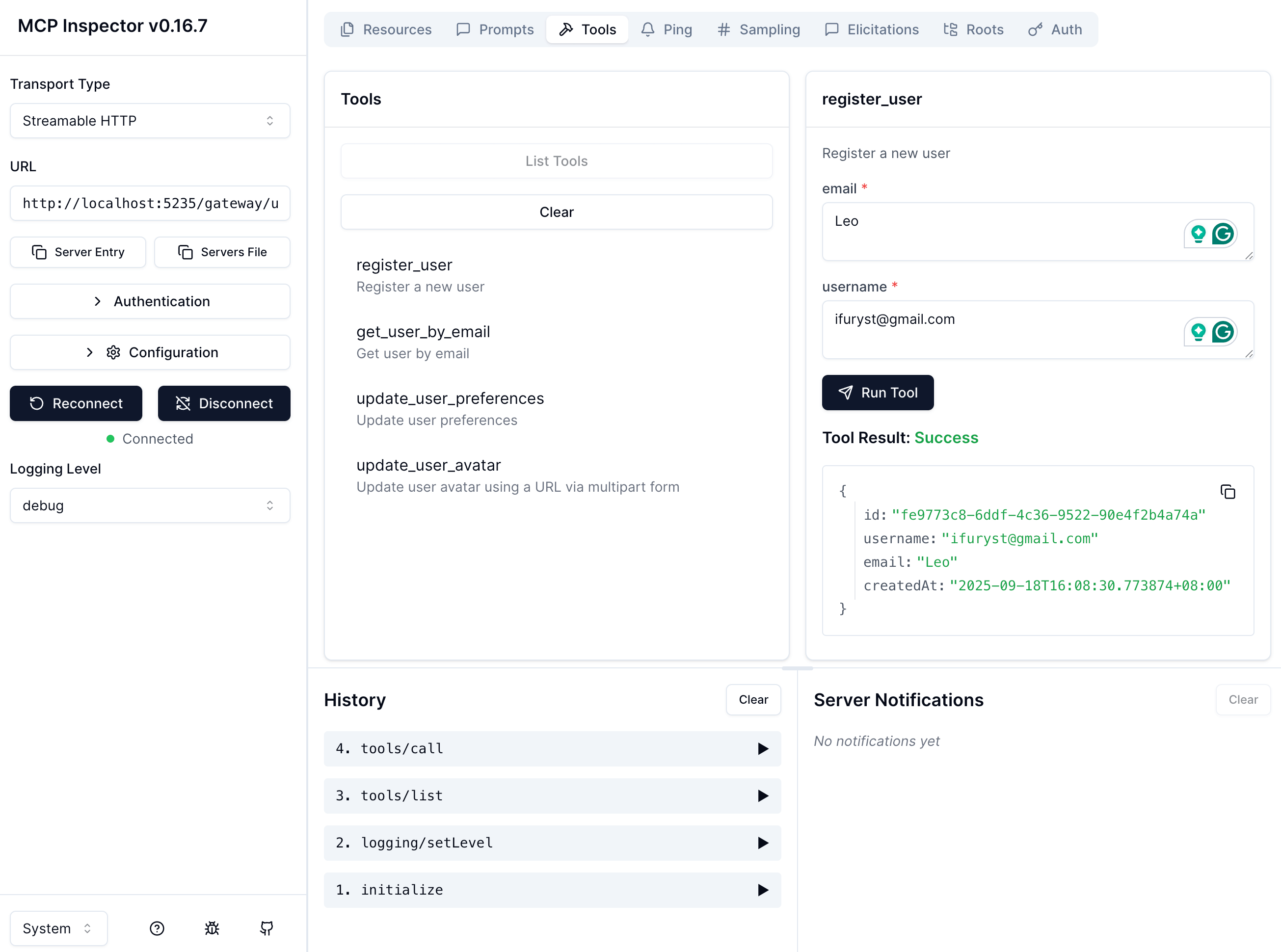
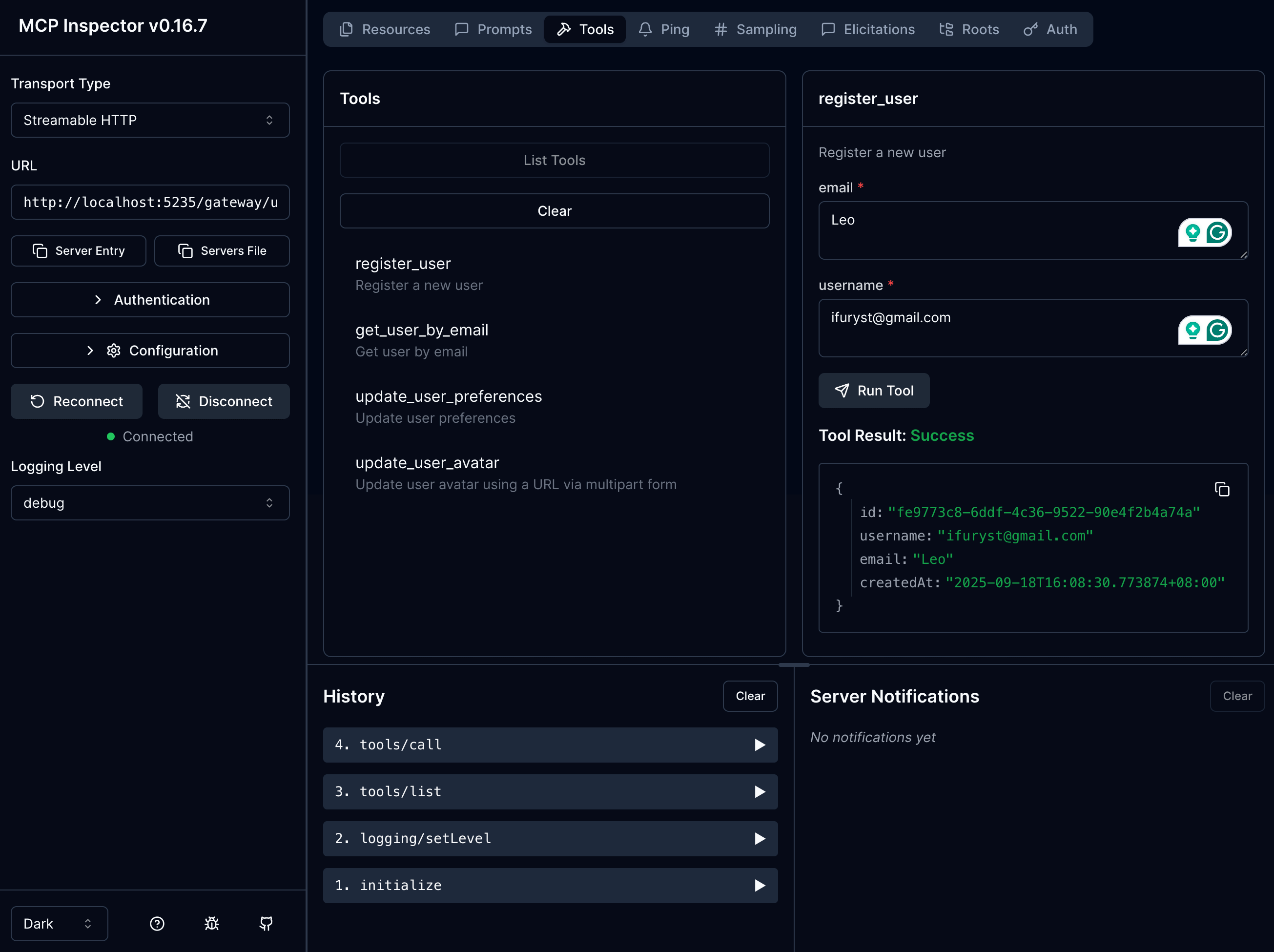
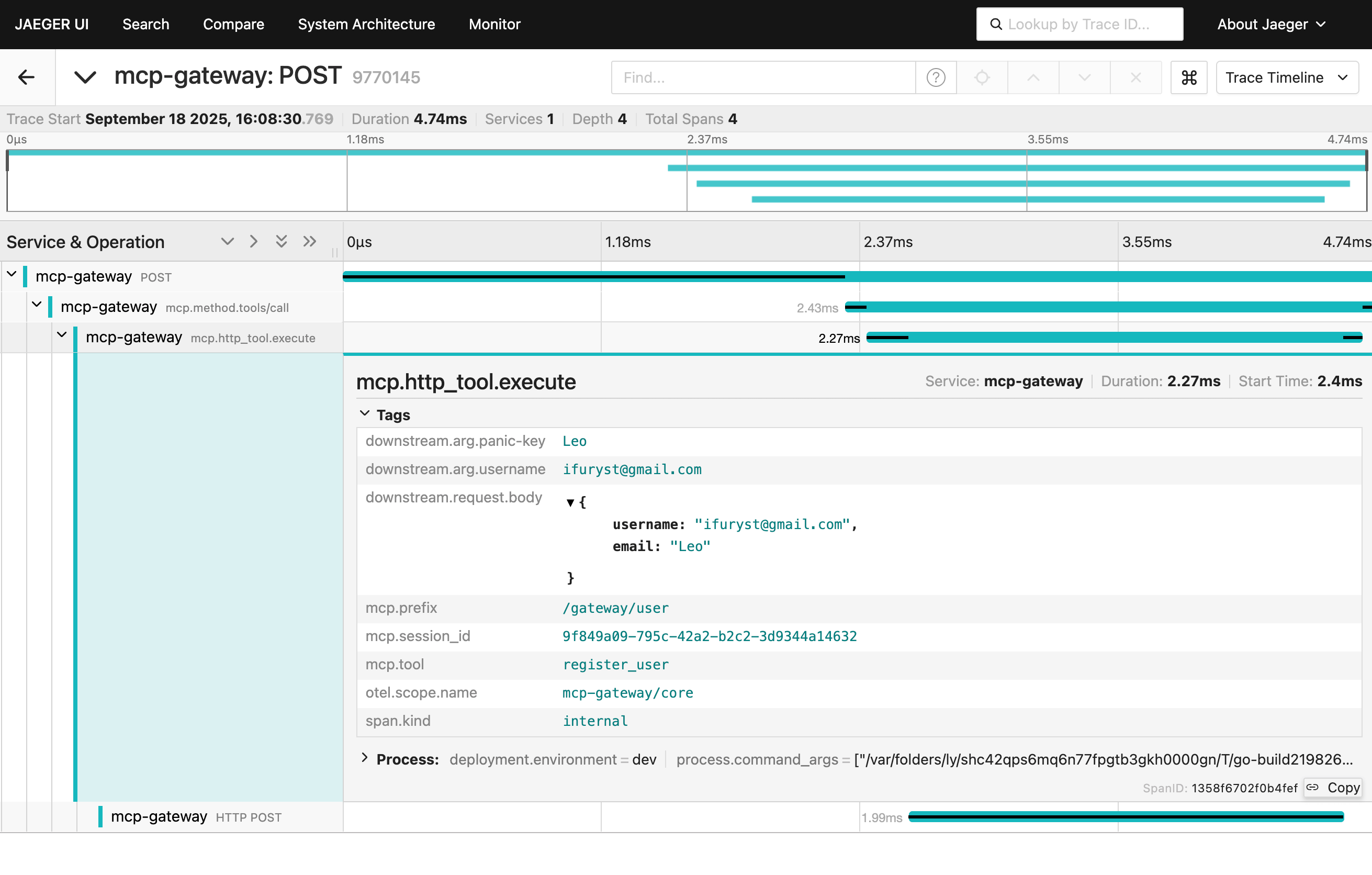 Capturing request fields or bodies can expose sensitive data (tokens, passwords, PII). Keep disabled by default, use minimal sampling and narrow field selection in controlled environments.
## Configuration File Location
By default, configuration files should be placed in the following locations:
* Container deployment: `/app/configs/mcp-gateway.yaml`
* Binary deployment: `./configs/mcp-gateway.yaml`
## Hot Reload Mechanism
MCP Gateway supports hot reload configuration, allowing new configurations to be applied without restarting the service:
When configuration changes occur, reload is triggered through configured notification methods (signal, api, redis)
Before reloading, the validity of the new configuration is verified to ensure stable service operation
After validation passes, smoothly switch to the new configuration without interrupting ongoing connections
## Best Practices
* Recommended storage type: `db` with SQLite
* Notification type: `composite` or `signal`
* Session storage: `memory` or `redis`
* Storage type: `db` with PostgreSQL or MySQL
* Notification type: `redis` or `composite`
* Session storage: recommended `redis`
* Use strong passwords to protect Redis and database
* Regularly backup configuration data
* Monitor service health status and performance metrics
Capturing request fields or bodies can expose sensitive data (tokens, passwords, PII). Keep disabled by default, use minimal sampling and narrow field selection in controlled environments.
## Configuration File Location
By default, configuration files should be placed in the following locations:
* Container deployment: `/app/configs/mcp-gateway.yaml`
* Binary deployment: `./configs/mcp-gateway.yaml`
## Hot Reload Mechanism
MCP Gateway supports hot reload configuration, allowing new configurations to be applied without restarting the service:
When configuration changes occur, reload is triggered through configured notification methods (signal, api, redis)
Before reloading, the validity of the new configuration is verified to ensure stable service operation
After validation passes, smoothly switch to the new configuration without interrupting ongoing connections
## Best Practices
* Recommended storage type: `db` with SQLite
* Notification type: `composite` or `signal`
* Session storage: `memory` or `redis`
* Storage type: `db` with PostgreSQL or MySQL
* Notification type: `redis` or `composite`
* Session storage: recommended `redis`
* Use strong passwords to protect Redis and database
* Regularly backup configuration data
* Monitor service health status and performance metrics